

I found it surprisingly difficult to find documentation that demonstrates how to add MULTIPLE items to a dynamo DB from a single JSON file. Well here is it, plain and simple. I've included a few different types of examples.
Here's the template:
{
  "DDBTableName":[
  {
    "PutRequest":{
      "Item":{
          "keyName":{"DataType":"Value1"}
        }
      }
    },
  {
    "PutRequest":{
      "Item":{
          "keyName":{"DataType":"Value2"}
        }
      }
    }
  ]
}
Here's a sample table called HotelInfoAccessibility. It has a single key called "text". Real fancy, I know.
{
    "HotelInfoAccessibility": [
        {
            "PutRequest": {
                "Item": {
                    "text": { "S": "Grab bars on tub walls"}
                }
            }
        },
        {
            "PutRequest": {
                "Item": {
                    "text": { "S":  "Shower chairs"}
                }
            }
        },
        {
            "PutRequest": {
                "Item": {
                    "text": { "S": "Telephones with volume control"}
                }
            }
        }
    ]
}
If you copy and paste to quickly fill in another table, DON'T FORGET TO CHANGE THE TABLE NAME. I did it... it wasn't fun.
This next example is also simple. It's a two key table called MenuLinks. The primary key is href, the sort key is text. I also include a class key cause that's probably a thing I need.
{
    "MenuLinks": [
        {
            "PutRequest": {
                "Item": {
                    "class": {
                        "S": "info"
                    },
                    "href": {
                        "S": "#hotelinfo"
                    },
                    "text": {
                        "S": "info"
                    }
                }
            }
        },
        {
            "PutRequest": {
                "Item": {
                    "class": {
                        "S": "rooms"
                    },
                    "href": {
                        "S": "#rooms"
                    },
                    "text": {
                        "S": "rooms"
                    }
                }
            }
        },
        {
            "PutRequest": {
                "Item": {
                    "class": {
                        "S": "dining"
                    },
                    "href": {
                        "S": "#dining"
                    },
                    "text": {
                        "S": "dining"
                    }
                }
            }
        },
        {
            "PutRequest": {
                "Item": {
                    "class": {
                        "S": "events"
                    },
                    "href": {
                        "S": "#events"
                    },
                    "text": {
                        "S": "events"
                    }
                }
            }
        },
        {
            "PutRequest": {
                "Item": {
                    "class": {
                        "S": "attractions"
                    },
                    "href": {
                        "S": "#attractions"
                    },
                    "text": {
                        "S": "attractions"
                    }
                }
            }
        }
    ]
}
And if you want to get super fancy, you can nest your json, should work the same way.
Once you've got your data properly formatted and saved to a json file, you can run the aws cli to write these items to the table.
aws dynamodb batch-write-item --request-items file://menu_links.json
Make sure you point to the correct file location, obviously. The response will be:
{
    "UnprocessedItems": {}
}
Login to the DynamoDB console, or use the cli or another program to query your data.
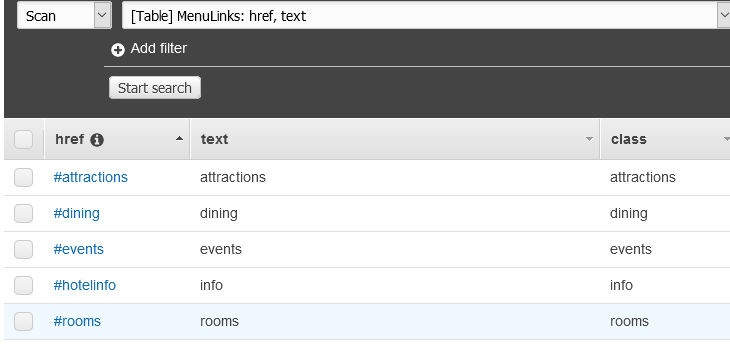
That's what I've been working on today. Some days are more productive than other :)
-AJ
About the author
I'm a technical advocate who it looking for new challenges. I will use this blog to post new challenges, find solutions and stay technically active.
Comments
Join the discussionNo comments yet. Be the first to comment.